
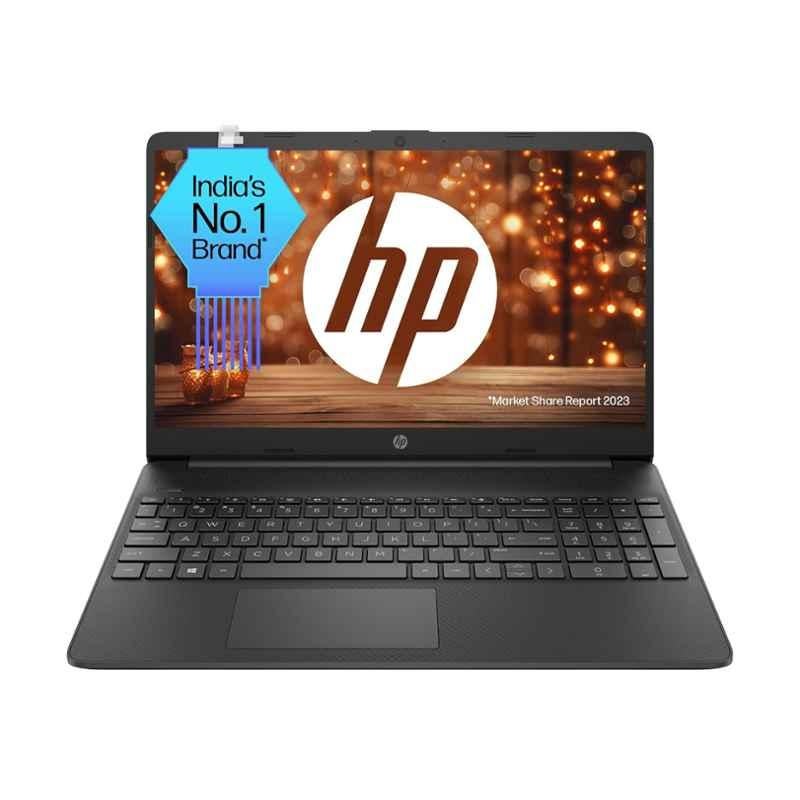
HP 15.6-inch Laptop: What to Know Before You Buy
An HP 15.6-inch laptop can be a practical choice for work, study and everyday use. Its screen is larger than those on many compact laptops, giving you more room for documents, web pages and video, while the laptop remains portable enough to move between home, work and school.
HP sells laptops in a range of configurations, so “HP 15.6-inch laptop” does not describe one fixed specification. Processor, memory, storage, screen quality, ports and other features vary by model. Checking the full product details is essential before choosing one.
Why choose a 15.6-inch screen?
A 15.6-inch display offers a useful balance between viewing space and portability. It can make working with spreadsheets, writing assignments or watching films more comfortable than using a smaller screen. Many models also include a full-size keyboard, sometimes with a separate numeric keypad, which may be handy for entering figures.
The trade-off is size and weight: a 15.6-inch laptop is generally less compact than a 13- or 14-inch alternative. If you plan to carry it every day, check the listed weight and dimensions as well as the screen size.
Performance and everyday tasks
HP 15.6-inch laptops are available with different processors and memory capacities. A basic configuration may suit browsing, email, video calls and document editing. More demanding tasks, such as running several applications at once, editing large files or using creative software, may benefit from a faster processor and more memory.
Look at the exact processor model rather than relying only on a broad description such as “Intel Core” or “AMD Ryzen”. Also check how much memory is installed and whether it can be upgraded. Requirements differ between models, and some laptops have memory that cannot be changed after purchase.
Storage and operating system
Many modern laptops use solid-state drive (SSD) storage, which can help the computer start up and open applications quickly. Storage capacity determines how much room is available for programmes, documents, photos and videos. If you keep a large library of files on your laptop, consider a model with more storage or plan to use an external drive or cloud storage.
Check which version of Windows is included, if any, and whether the laptop meets the requirements for the software you intend to use. Some models may be sold with different operating systems or software bundles.
Display, webcam and connections
Screen size alone does not tell you how good a display will look. Compare the resolution, brightness and panel details, particularly if you expect to work outdoors, view detailed images or spend long periods in front of the screen. Touchscreen availability also varies.
For online meetings, check the webcam and microphone specifications. It is also worth reviewing the ports: USB-A and USB-C connections, HDMI, an audio socket and a memory-card reader may be useful, but the selection differs between models. If you rely on Wi-Fi or Bluetooth accessories, confirm that the laptop supports the features you need.
Battery life and portability
Battery life depends on the laptop’s configuration, settings and workload. Manufacturer estimates can provide a guide, but actual results may be shorter when streaming video, using demanding applications or running the screen at high brightness. Read independent reviews where possible and check whether the charger’s size and weight suit your routine.
How to choose the right HP 15.6-inch laptop
- For everyday home use: Prioritise a suitable processor, SSD storage and enough memory for your usual applications.
- For study or office work: Consider keyboard comfort, webcam quality, battery life and the ports you need for accessories or an external monitor.
- For creative work: Check processor performance, memory, storage and display quality. Confirm that the software you use is supported.
- For gaming: Look for a dedicated graphics card and a suitable display, and check reviews for performance and cooling. Many standard configurations are designed for general use rather than demanding games.
- For frequent travel: Compare weight and battery performance with smaller laptops before deciding that a 15.6-inch model is the best fit.
Frequently asked questions
Is an HP 15.6-inch laptop good for students?
It can be a good option for research, assignments, video calls and general study. The right choice depends on the course requirements, the software used and how often the laptop needs to be carried. Students who travel frequently may prefer a lighter model.
Can an HP 15.6-inch laptop be used for gaming?
Some configurations may handle games, but gaming capability depends largely on the graphics hardware and cooling system. Check the exact specifications and look for reviews that test the games you want to play.
Are all HP 15.6-inch laptops the same?
No. The screen size may be similar, but processors, memory, storage, display features, ports and battery capacity can differ considerably. Compare the complete model number and specification before purchasing.
Final thoughts
An HP 15.6-inch laptop may suit anyone looking for a larger screen and a versatile computer for everyday tasks. The best model depends on how it will be used, so compare the specific configuration rather than choosing by screen size or brand alone. Checking the processor, memory, storage, display, battery information and warranty can help you find a laptop that fits your needs and budget.
5 Essential Tips for Buying and Maintaining an HP 15.6-Inch Laptop
- Check the exact HP model and specifications before buying.
- A 15.6-inch screen is roomy but less portable than smaller laptops.
- Choose enough RAM and storage for your everyday tasks.
- Keep the vents clear to help prevent overheating.
- Update Windows and HP drivers regularly.
Check the exact HP model and specifications before buying.
Before buying an HP 15.6-inch laptop, check the exact model number and full specifications, as features can vary significantly between models. Compare the processor, memory, storage, screen resolution, ports and battery details to make sure the laptop suits your needs. Also confirm whether the memory or storage can be upgraded, and check what is included in the box and warranty.
A 15.6-inch screen is roomy but less portable than smaller laptops.
A 15.6-inch screen gives you plenty of space for documents, web pages and video, making everyday tasks more comfortable. However, laptops with this display size are generally larger and heavier than compact models, so they may be less convenient to carry around. If you travel often or take your laptop to work or school each day, compare its weight and dimensions with those of smaller laptops before choosing.
Choose enough RAM and storage for your everyday tasks.
Choose enough RAM and storage to suit the way you use your HP 15.6-inch laptop. More RAM can help it run smoothly when you have several tabs or apps open, while an SSD with plenty of capacity gives you room for software, documents, photos and videos. Check the specifications before buying, and consider whether you can upgrade the RAM or add storage later.
Keep the vents clear to help prevent overheating.
Keep the vents on your HP 15.6-inch laptop clear to help air circulate and carry heat away from the internal components. Use it on a firm, flat surface rather than a bed, cushion or blanket, which can block the vents. Regularly check for dust around the openings and clean gently, following HP’s care guidance.
Update Windows and HP drivers regularly.
Keep your HP 15.6-inch laptop running smoothly by regularly installing Windows updates and the latest drivers recommended for your specific HP model. Updates can improve security, fix software problems and help components such as the graphics, Wi-Fi and audio work properly. Use Windows Update and HP’s official support tools or website, and check that any driver matches your laptop’s exact model before installing it.